Home/Case studies/Macrulez App Platform
Vue 3Node.js · ExpressDockerWebSocketTraefikSide project

A PaaS platform
for deploying Vue
and Nuxt apps

One Dockerfile is fine. Ten projects with different branches, environment variables, and Node versions — not fine anymore. I automated the full cycle: clone → npm ci → build → Docker → Traefik. Without a single manual command.

0manual commands during deployment
5pipeline steps: clone → install → build → image → swap
< 5 seccontainer swap with zero downtime
3 typesvue-static · nuxt-static · nuxt-ssr
The problem

Once —
that's fine.
Ten times — no.

Deploying a new app manually looked like this: write a Dockerfile, write a Traefik config, drop it in the right folder, run docker compose up. One project — that's simple. Once there are several, each with its own branch, its own Node version, and its own environment variables — managing it by hand starts to get annoying.

What I wanted: open the panel, point at a repository and domain, hit "Deploy" — and let the platform handle the rest. And also see what's happening right in the browser, without opening a terminal.

I made the hosting mechanism part of the platform, with an "Apps" module in the admin panel to manage it.
What was built

From the list
to settings —
all in one place.

Seven screens, each solving its own task — from triggering a deploy to live-streaming container logs.

01

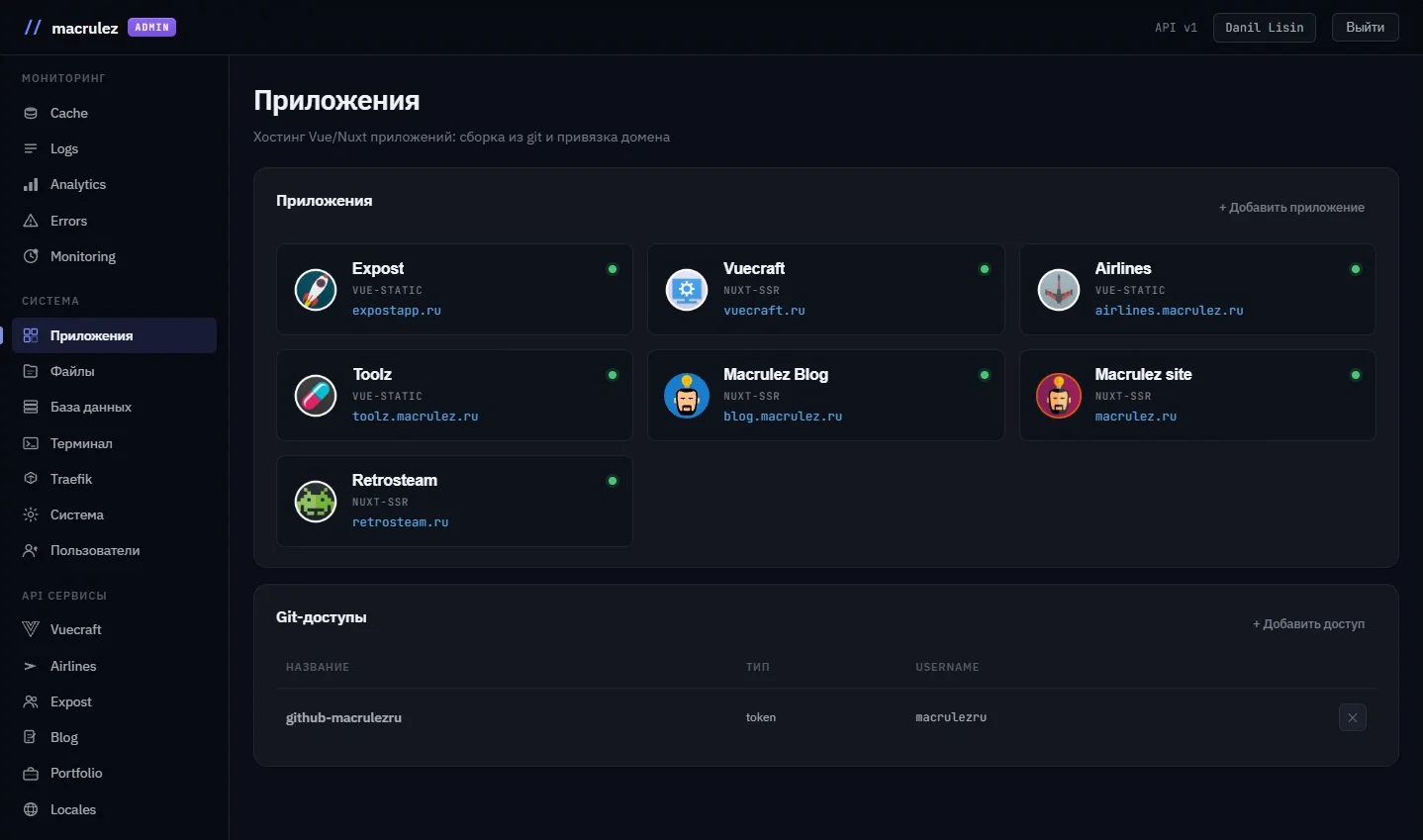
Application list

A grid of cards: an avatar with a deterministic color (the same across any reload), name, type (vue-static / nuxt-ssr), domain. A colored status dot — live, updated over WebSocket without a reload. Open a rebuild, come back to the list — the dot is already blinking blue. Add a new app in another browser — the card appears automatically.

WebSocketreal-time statusdeterministic color
02

Git access

A credential store for private repositories. Two methods: a PAT token (HTTPS) and an SSH deploy key. The secret is saved to the database and is never returned to the client after saving. One token — for several repositories in an organization: pick it from a dropdown when creating an app, and that's it.

PATSSH deploy keywrite-only secret
03

Dashboard and build

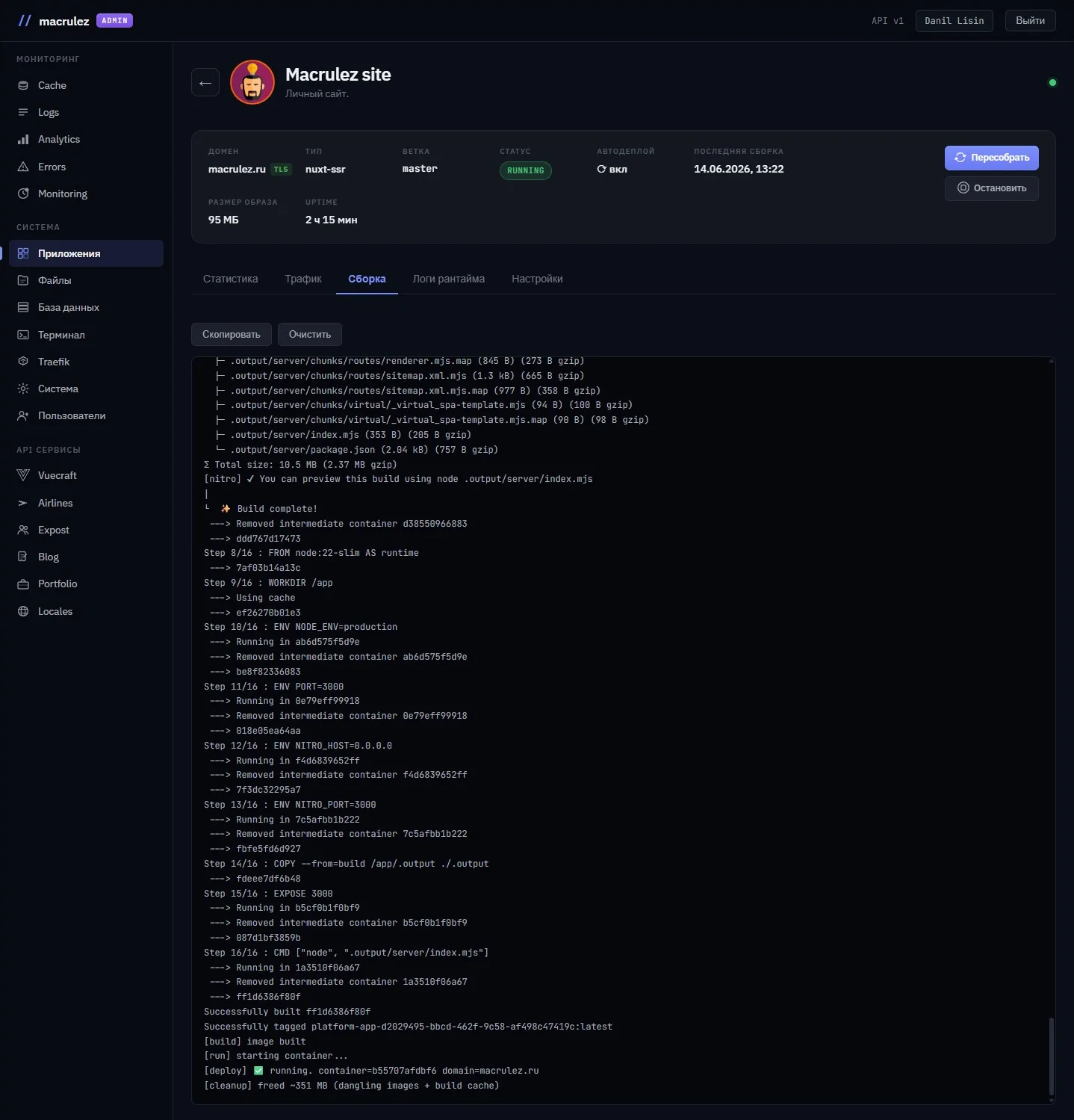
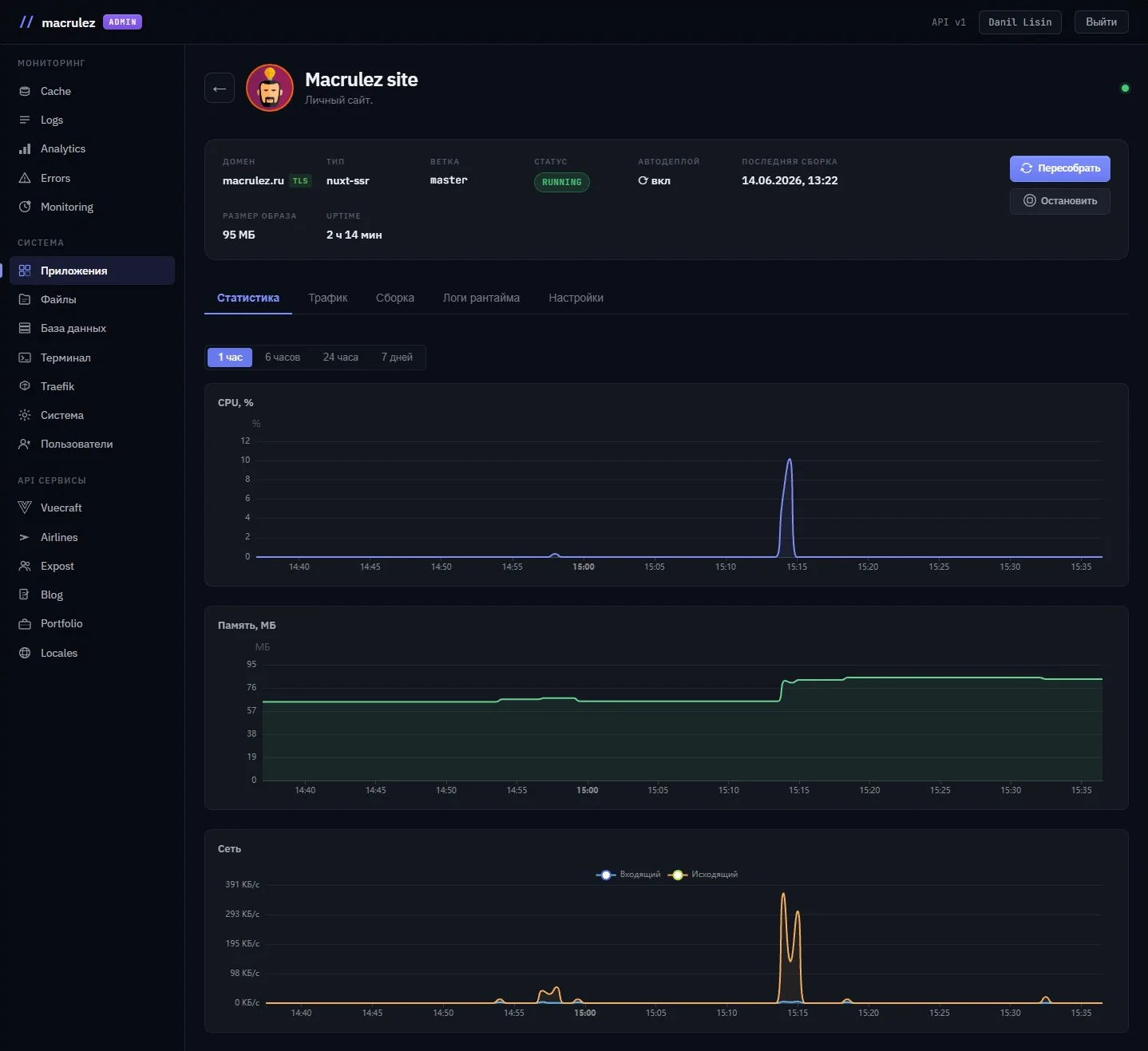
A header with an avatar, 8 summary cells (domain, type, branch, status, autodeploy, build date, image size, uptime). "Rebuild" and "Stop" buttons. A full build log in real time, right in the browser, over WebSocket: ANSI escape codes are processed via ansi_up — colored Vite lines, Nuxt progress bars, green npm checkmarks — just like in a terminal.

WebSocket build logansi_upsmart autoscroll
04

Statistics

CPU, RAM, and network traffic — data from the Docker Stats API every 30 seconds. Four periods: 1h / 6h / 24h / 7 days. Filled ECharts charts. Inbound and outbound traffic — two series on one chart.

Docker StatsEChartsCPU · RAM · network
05

Traffic

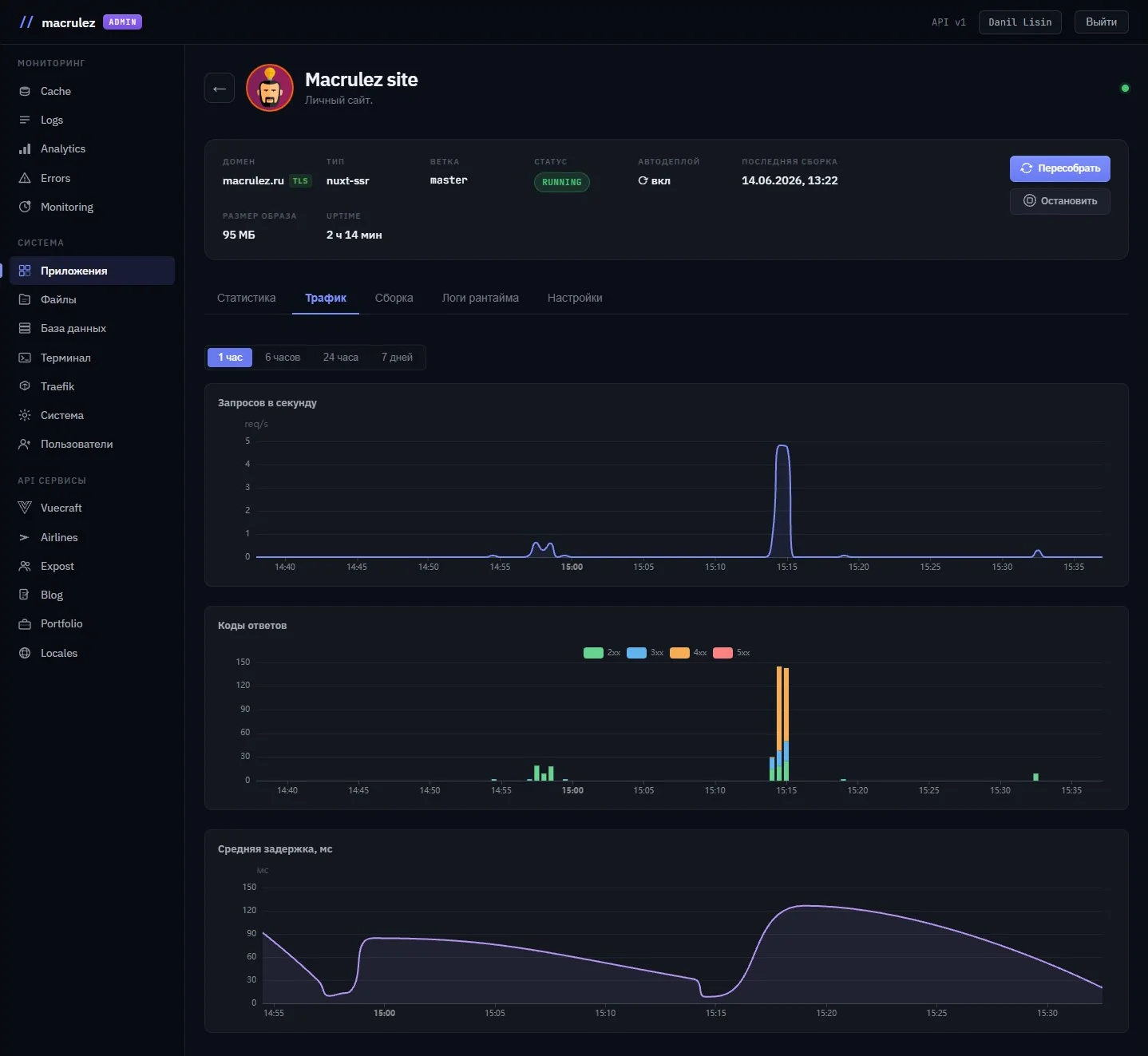
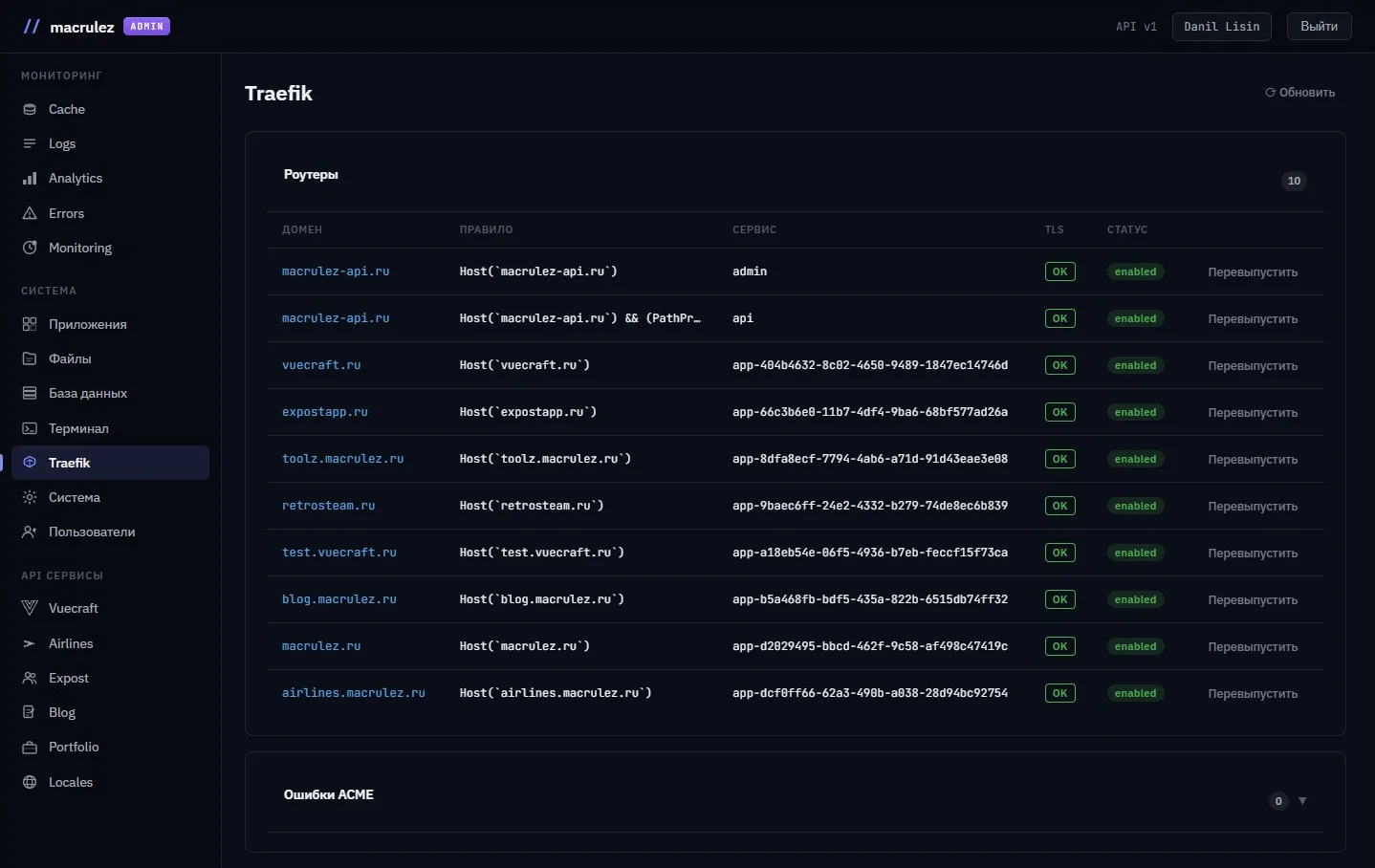
HTTP metrics from Traefik's Prometheus exporter — at the proxy level, not the container's. An RPS line, stacked bars of response codes (2xx green / 3xx blue / 4xx orange / 5xx red), average latency. You can immediately see if 4xx starts climbing — without digging through logs.

TraefikPrometheusstacked barslatency
06

Runtime logs

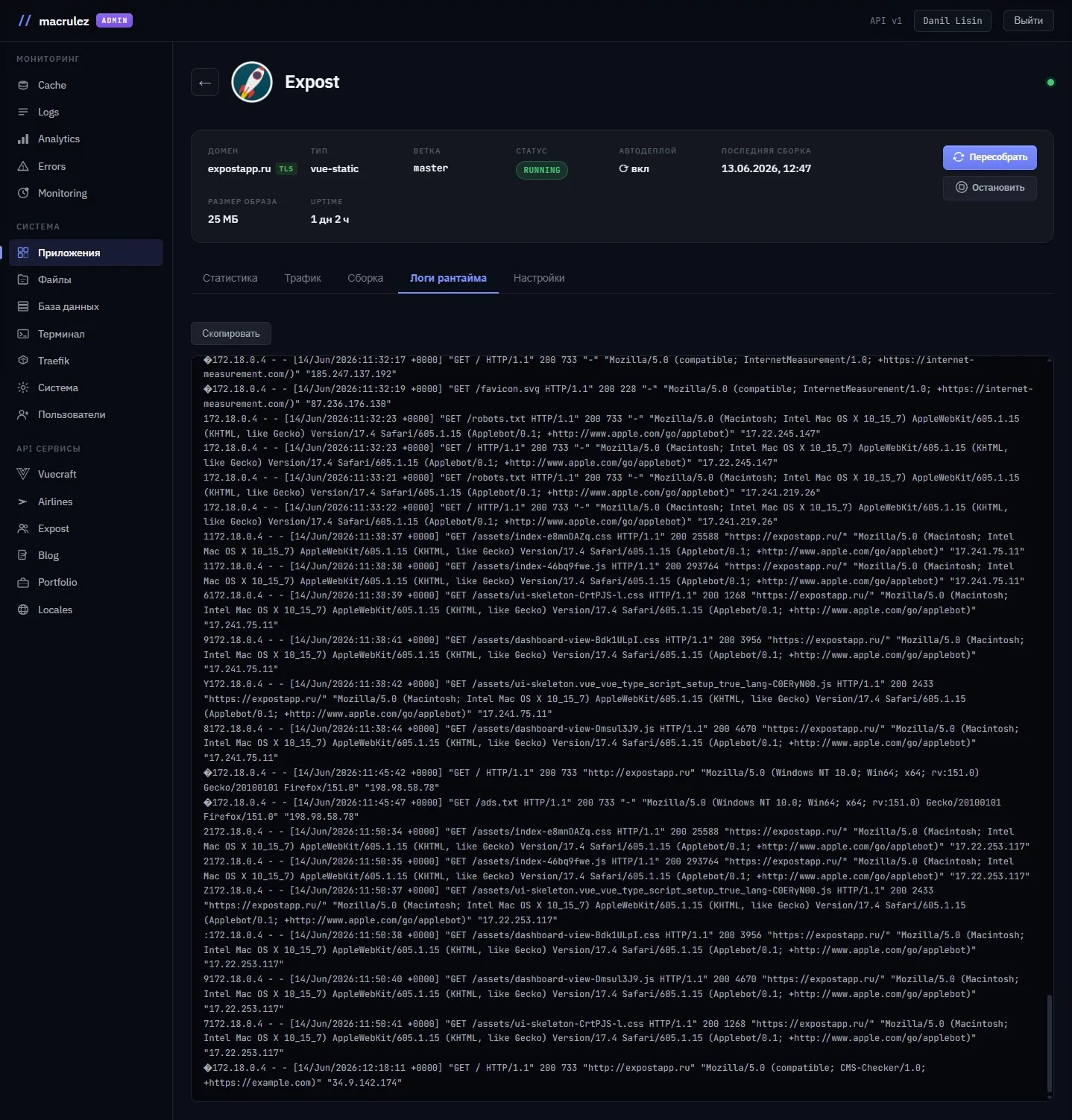
The equivalent of docker logs --follow — right in the browser. Switch to the tab — streaming turns on, leave the tab — it turns off. Especially handy for Nuxt SSR: server errors, hydration warnings — all in real time without a terminal.

docker logs streamWebSocketon-demand
07

Settings

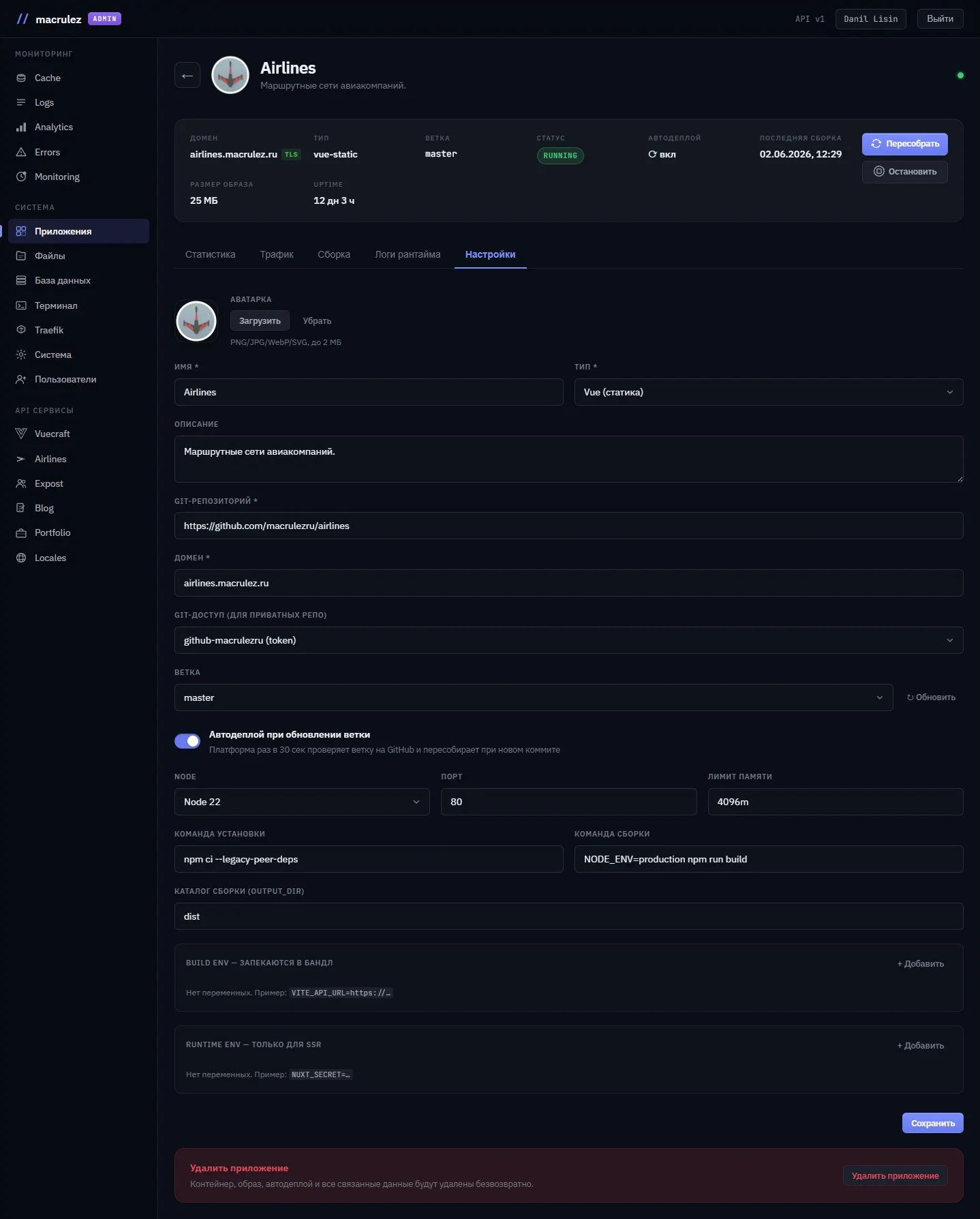
A form with two layers of env variables: Build env is baked into the bundle at build time (VITE_* / NUXT_PUBLIC_*), Runtime env is passed to the container at startup. Real branches are loaded via git ls-remote with a button click. Auto-presets for buildCmd / outDir when the type changes — but only if the field hasn't been edited manually. Autodeploy with a configurable interval from the API.

Build / Runtime envgit ls-remoteautodeploy
Under the hood

Non-trivial
decisions.

The details that make the difference between "it works" and "it works correctly."

  1. 01
    WebSocket: syncing state across tabs

    Status dots update in real time over a single WebSocket channel. Click "Rebuild" in one tab — the dot blinks blue in every other one. Add an app — a new card appears for all connected clients without a reload. The server broadcasts changes to all connections; the client reacts with a state patch keyed by app ID.

    broadcastpatch by IDno reload
  2. 02
    Smart autoscroll in the log

    While the user is at the bottom edge, new lines are pulled in automatically. Scroll up — autoscroll turns off, the log stops jumping. Get back to the very bottom — it turns back on. The trigger threshold is 24 pixels — so it doesn't turn off from one stray mouse-wheel movement. While it's off, a banner appears: "autoscroll off — scroll down to turn it back on."

    scroll thresholdlog UXansi_up
  3. 03
    The queued flag: buttons don't flicker between 202 and the first WS event

    There's a gap between clicking "Rebuild" and the first status event over WebSocket: the API responded with 202, but the build hasn't started yet. Without protection, the buttons unlock for a split second, then lock again — a noticeable flicker artifact. An internal queued flag is set, keeping the buttons locked exactly until the first status update arrives over WebSocket.

    race conditionoptimistic UIqueued flag
  4. 04
    Network traffic delta: handling a reset on restart

    Docker counts traffic as cumulative counters since the container started. On the client, the delta between adjacent points is taken and divided by the interval — giving bytes per second. When the container restarts, the counter resets to zero, and the delta goes negative. Such outliers are silently dropped — so as not to draw false negative spikes right after a deploy.

    delta calculationcounter resetdefensive filtering
  5. 05
    Masking sensitive environment variables

    If a variable's name contains one of the words TOKEN / SECRET / PASSWORD / KEY / PRIVATE / AUTH / CERT / SALT, it's automatically flagged as sensitive. The table shows the first 4 characters and "…". A lock button: click it — it's revealed for the current session, click again — it's hidden. This isn't server-side encryption, just protection against an accidental glance at the screen.

    keyword detectionpartial revealenv security UX
Full cycle

Clicked
"Deploy."
Done.

The platform runs five steps without any user involvement. Cloning — a fresh copy of the specified branch, authenticated with the saved PAT or SSH key. Installing dependenciesnpm ci or a custom command. Buildnpm run build with the passed Build env variables. Docker build — the image is packaged and tagged. Swap — the old container stops, the new one starts.

Traefik automatically picks up the new route and starts serving traffic on the right domain. The whole process takes anywhere from 30 seconds to a few minutes depending on the project, and the log streams straight into the browser over WebSocket the entire time.

Autodeploy is optional. The platform tracks the branch's HEAD itself via git ls-remote and triggers a rebuild whenever a new commit appears. The check interval is configured through the orchestrator's environment variable, and its actual value is pulled into the form via the API — no hardcoding.

Before the platform, every new project meant a new Dockerfile, a new Traefik config, and a manual docker compose up. Now it's the same thing through a form in the browser.

Screenshots

What it
looks like.

"A good tool is one that makes the next task faster, not just one that automates the current one."

— from building Macrulez App Platform
Next step

Need DevOps automation or admin tooling?

I design and build: from CI/CD pipelines to full-featured admin panels. I work with Vue 3, Node.js, and Docker.